
Compare
Glasspad vs Coast
Two new ways to control your Mac from your iPhone, side by side.
In short
Coast, from LeShan Chen, turns an iPhone, iPad or Apple Watch into decks of controls, a trackpad and a keyboard for a Mac, free with a $2.99 Pro upgrade. Glasspad is free with nothing to buy, open source, and for iPhone or Android with a Mac or Windows PC, with buttons for 70+ apps and a remote for Netflix and YouTube.
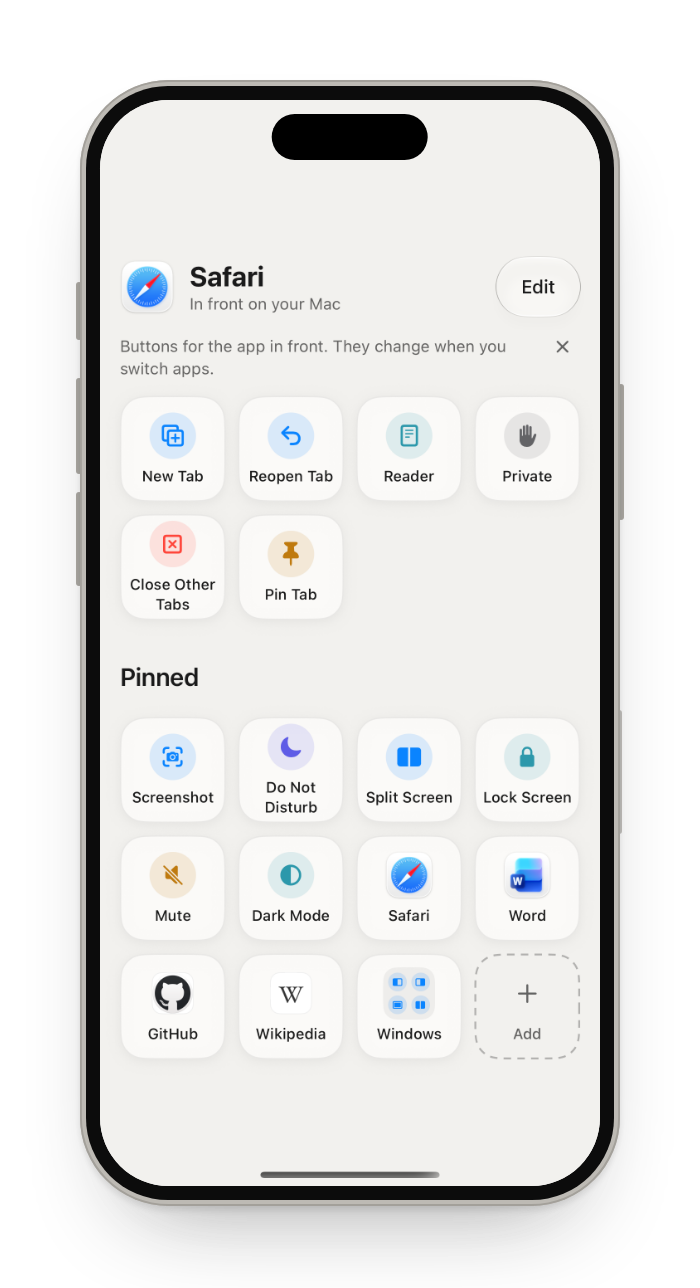
Side by side
| Glasspad | Coast | |
|---|---|---|
| Phone | Partly. iPhone (iOS 18 or later) and Android (10 or later) | Yes. iPhone and iPad (iOS 17 or later), and Apple Watch with Pro |
| Computer | Partly. Mac (macOS 14 or later) and Windows 10 or 11 | Partly. Mac, with its free menu bar app |
| Price | Yes. Free. No ads or in-app purchases | Partly. Free. Coast Pro $2.99 once, for macros, screen mirror, air mouse, drawing, Apple Watch, iCloud sync and more grids |
| Install | Partly. On a Mac, a one-line installer that builds the app with Xcode and a free Apple ID, and renews the iPhone app every 7 days; Windows and Android from GitHub Releases | Yes. App Store, plus the Mac app from its website |
| Connection | Partly. Same Wi-Fi, paired by QR code, encrypted | Partly. Same Wi-Fi, paired by a six-digit code, encrypted |
| Trackpad | Yes. Your Mac's own gestures: Spaces, Mission Control, pinch, force click, with haptics | Yes. Mac gestures, press to click, and an optical mouse with the camera |
| Buttons | Yes. Ready-made buttons for 70+ apps that follow the app in front, plus your own | Yes. Decks you design from about 40 controls, in grids up to 8 by 12, that can switch with the app in front |
| Also | Yes. Media, Remote for 11 players, Present with a laser, Dock, macros, Clipboard, Displays, Layouts, StandBy | Yes. Clipboard, a talk timer and Home Screen widgets; now playing, screen mirror and a laser with Pro |
| Source code | Yes. Open source, MIT | No. Not open source |
Has itPartly, or with limitsDoes not
Which one fits you
Choose Coast if
- You want an iPad or Apple Watch too.
- You want to see the Mac's screen on the phone, or an air mouse, and $2.99 is fine.
- You want to design your own controls, with sliders, dials and jog wheels.
Choose Glasspad if
- You want every feature free, macros and now playing included, and code you can read.
- You want buttons that are ready for 70+ apps without building decks.
- You want a couch remote for Netflix and YouTube, and window and display control.
Questions
Is Coast free?
The app and its Mac app are free. Coast Pro, $2.99 once on the US App Store, adds macros, screen mirroring, the air mouse, drawing and a laser, the Apple Watch app, iCloud sync and more grids.
Is there a free and open source alternative to Coast?
Yes. Glasspad is free with nothing to buy, and its code is public under the MIT license. It works with an iPhone or Android phone and a Mac or Windows PC. On a Mac it installs with a Terminal command instead of the App Store.
Can Glasspad show my Mac's screen on the iPhone?
No. Glasspad has no screen mirroring. Its Displays mode shows a map of your displays and windows to move and tile them. For the screen itself, Coast Pro or a screen sharing app fits better.
Does Glasspad work on iPad or Apple Watch?
There is no Watch or iPad app. Glasspad's Lock Screen controls also show on Apple Watch. For an iPad, Coast is a good choice.
Keep exploring
Sources
Checked on October 17, 2026. Prices are from the US App Store and can differ in other countries.
Get Glasspad. It is free.
Glasspad is free and open source (MIT). It works with a Mac on macOS 14 or later or a PC on Windows 10 or 11, 64-bit, and an iPhone on iOS 18 or later or an Android phone on Android 10 or later, on the same Wi-Fi. On a Mac, paste this into Terminal:
curl -fsSL https://raw.githubusercontent.com/Soham109/glasspad/main/install.sh | bashThe script builds it with Xcode 26 or later and your free Apple ID, and waits for you where Apple needs a click. Windows and Android install from GitHub Releases. Every install step Help in the guide