
Split Screen
Split screen on your Mac from your iPhone
Two windows side by side, top and bottom or in quarters, in one tap.
In short
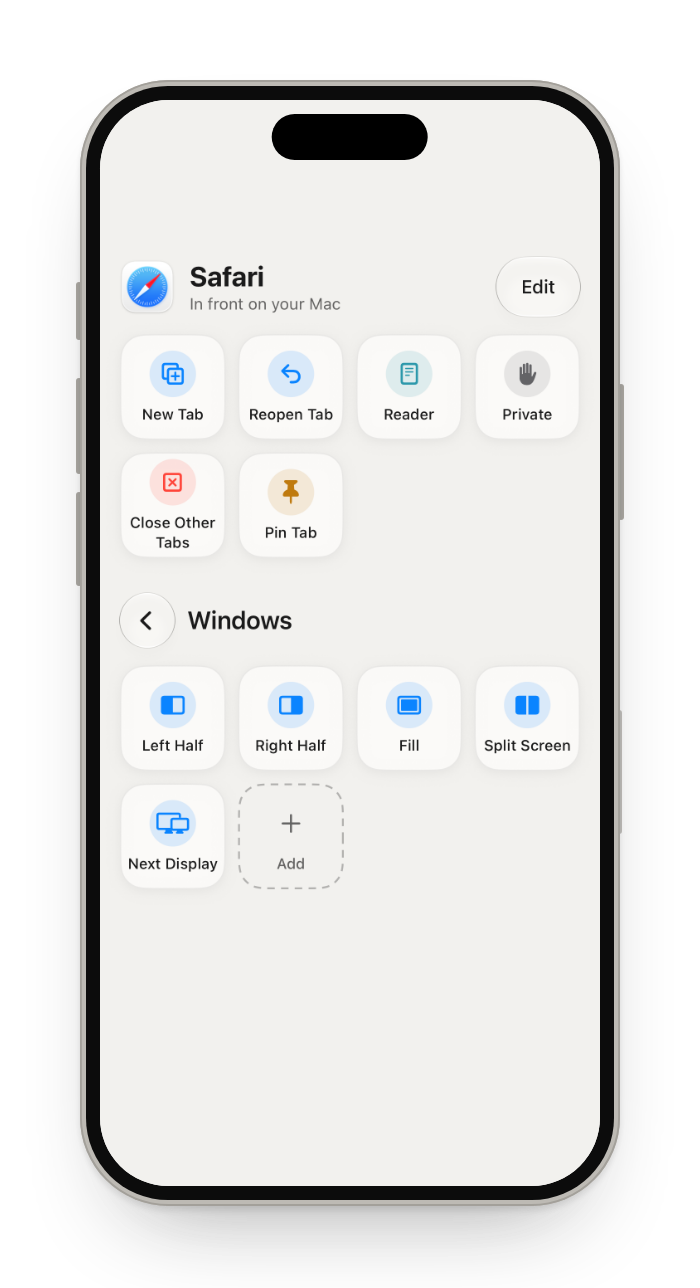
On a Mac you split the screen from the green button at the top left of a window, or, on macOS 15 and later, by pressing fn, control and the left or right arrow. Glasspad puts this on your iPhone: tap Split Screen, choose Left & Right, Top & Bottom, Quarters or Full Screen (Split View), pick the windows and the display, and see where each one will go before anything moves. Window buttons put the front window on a half or a quarter, Fill or Center.
Glasspad is free and open source (MIT). It works with a Mac on macOS 14 or later or a PC on Windows 10 or 11, 64-bit, and an iPhone on iOS 18 or later or an Android phone on Android 10 or later, on the same Wi-Fi.
What you get
Four ways to split
Left & Right, Top & Bottom, Quarters or Full Screen.
Window buttons
Halves, quarters, Fill and Center for the front window.
Any display
Pick the display, or send the front window to the next one.
See it first
Arrange shows where each window will go before anything moves.
How it works
Add Split Screen
Pin it in Actions from the Library, or keep it in a folder.
Tap it
Choose how to split, then the windows and the display.
Or use Displays
Touch and hold any window for the halves, Fill, Center and Split With.
Mac split screen shortcuts
| Keyboard shortcut, macOS 15 and later | On your iPhone with Glasspad | |
|---|---|---|
| Left or right half | Fn-Control-Left Arrow, or Right Arrow | Yes. Left Half or Right Half button |
| Top or bottom half | Fn-Control-Up Arrow, or Down Arrow | Yes. Top Half or Bottom Half button |
| Fill the screen | Fn-Control-F | Yes. Fill button |
| Center | Fn-Control-C | Yes. Center button |
| One quarter | No. No shortcut. Use Window › Move & Resize | Yes. Top Left, Top Right, Bottom Left and Bottom Right Quarter buttons |
| Back to the old size | Fn-Control-R | Yes. Return to Previous Size button |
| Two windows side by side | Fn-Control-Shift-Left Arrow, or Right Arrow | Yes. Split Screen, Left & Right |
| Two windows top and bottom | Fn-Control-Shift-Up Arrow, or Down Arrow | Yes. Split Screen, Top & Bottom |
| Four windows in quarters | No. No shortcut. Use Window › Move & Resize | Yes. Split Screen, Quarters |
| Three windows: one half and two quarters | Fn-Control-Option-Shift and an arrow | No. Not offered |
Has itPartly, or with limitsDoes not
On macOS 14 Sonoma
Window tiling, with its menu and these shortcuts, came with macOS 15. On macOS 14 the green button can still put two apps side by side in full screen Split View, but there is no shortcut to snap a window to a half. Glasspad's window buttons and Split Screen work on macOS 14 too: they move and size the windows themselves, through the Accessibility permission.
Questions
What is the keyboard shortcut for split screen on a Mac?
On macOS 15 and later, Fn-Control-Left Arrow puts the front window on the left half and Fn-Control-Right Arrow on the right. Add Shift to arrange the next window on the other half too. The same moves are in Window › Move & Resize.
How do I split my Mac screen top and bottom?
On macOS 15 and later, press Fn-Control-Shift-Up Arrow to put the front window on top and the next one below it, or choose Window › Move & Resize › Top & Bottom. In Glasspad, tap Split Screen and choose Top & Bottom.
Can I split my Mac screen into three or four?
Into four, yes: Quarters, in Window › Move & Resize or in Glasspad's Split Screen. Into three, macOS 15 has the & Quarters moves (one half and two quarters) with Fn-Control-Option-Shift and an arrow; Glasspad does not offer those.
Why is split screen not working on my Mac?
Tiling shortcuts need macOS 15 or later. Some apps have a minimum width and will not fit a half or a quarter. If dragging a window to the edge does nothing, check that tiling by dragging is on in System Settings, under Desktop & Dock.
What is the difference between tiling and Split View?
Tiled windows stay on your desktop with everything else. Split View puts two windows side by side in full screen, in a Space of their own. Glasspad does both: Left & Right tiles, Full Screen makes a Split View.
Does it work with two displays?
Yes. Pick the display in Arrange. If the windows are on different displays, the second one moves over first.
What if an app's window will not get narrow enough?
Some apps have a minimum width. Glasspad tells you which window will not fit instead of leaving them overlapped.
Does it leave room for Stage Manager?
Yes. Tiling keeps clear of Stage Manager's strip of apps.
Keep exploring
Sources
Checked on October 17, 2026.
Get Glasspad. It is free.
Glasspad is free and open source (MIT). It works with a Mac on macOS 14 or later or a PC on Windows 10 or 11, 64-bit, and an iPhone on iOS 18 or later or an Android phone on Android 10 or later, on the same Wi-Fi. On a Mac, paste this into Terminal:
curl -fsSL https://raw.githubusercontent.com/Soham109/glasspad/main/install.sh | bashThe script builds it with Xcode 26 or later and your free Apple ID, and waits for you where Apple needs a click. Windows and Android install from GitHub Releases. Every install step Help in the guide