
Displays
Control your Mac's displays from your iPhone
Move a window to another display, tile it, and set brightness.
In short
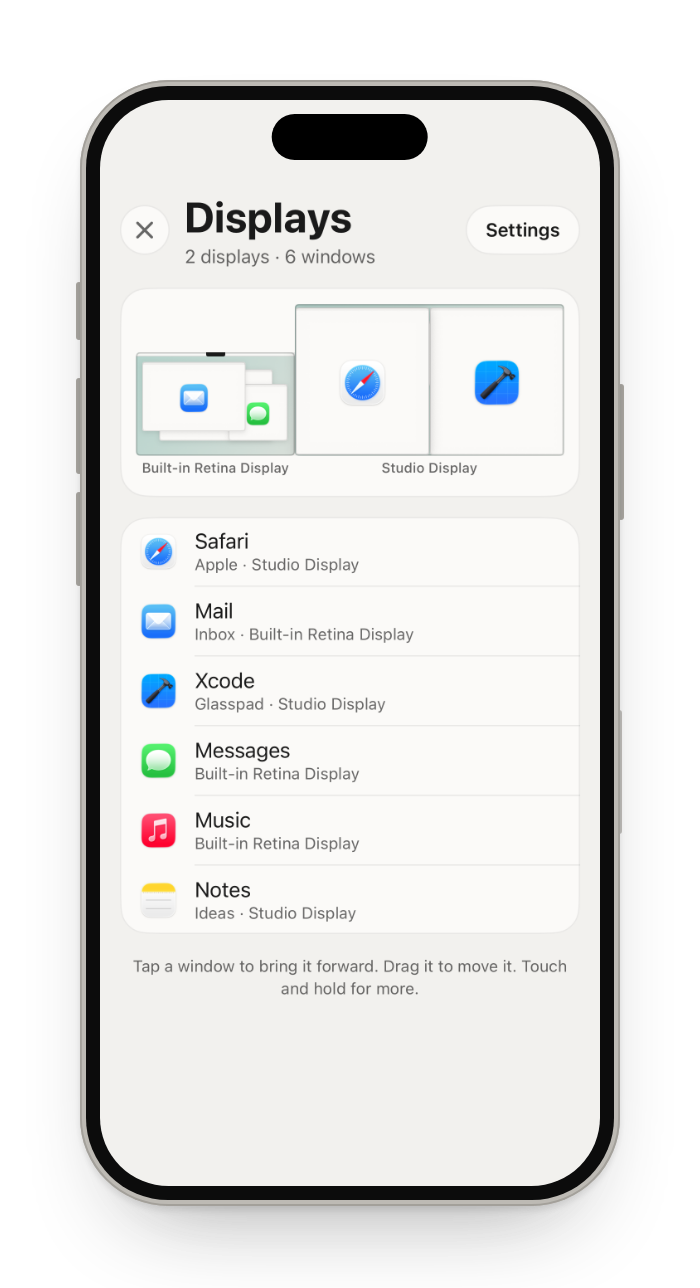
Glasspad's Displays mode shows your Mac's displays on your iPhone the way System Settings draws them, with every window on them. Tap a window to bring it forward, drag it to another display, or touch and hold it to tile, split, enter full screen, minimize or close it. Its settings set brightness, resolution, Night Shift, the main display, mirroring and the arrangement, and a new resolution goes back after 15 seconds unless you keep it.
Glasspad is free and open source (MIT). It works with a Mac on macOS 14 or later or a PC on Windows 10 or 11, 64-bit, and an iPhone on iOS 18 or later or an Android phone on Android 10 or later, on the same Wi-Fi.
What you get
As in System Settings
Your displays, drawn where they sit, with every window on them.
Drag between displays
Drag a window onto another display, or tap it to bring it forward.
Tile and split
Touch and hold a window for the halves, Fill, Center and Split With.
Brightness and more
Brightness, resolution, Night Shift, mirroring and the main display.
How it works
Open Displays
Tap the mode button at the top of the screen, then Displays.
Move a window
Drag it to another display, or touch and hold it for more.
Change a setting safely
A new resolution goes back after 15 seconds unless you keep it.
Questions
Can I move a window to another monitor from my iPhone?
Yes. Drag it onto the other display in Displays, or tap a Next Display button in Actions.
Can I change the resolution from my iPhone?
Yes, in the settings in Displays. A new resolution or mirroring goes back after 15 seconds unless you keep it, so a blank screen fixes itself.
Does it work with one display?
Yes. You still get the list of windows, and tiling, brightness, resolution and Night Shift.
What does the Mac need to allow?
Accessibility, in System Settings › Privacy & Security, so Glasspad can move windows. The installer walks you through it.
Keep exploring
Get Glasspad. It is free.
Glasspad is free and open source (MIT). It works with a Mac on macOS 14 or later or a PC on Windows 10 or 11, 64-bit, and an iPhone on iOS 18 or later or an Android phone on Android 10 or later, on the same Wi-Fi. On a Mac, paste this into Terminal:
curl -fsSL https://raw.githubusercontent.com/Soham109/glasspad/main/install.sh | bashThe script builds it with Xcode 26 or later and your free Apple ID, and waits for you where Apple needs a click. Windows and Android install from GitHub Releases. Every install step Help in the guide